

Glassdoor scraping works best when you decide on the dataset before choosing the tool. Jobs, company profiles, reviews, salaries, and interviews live on different page types, so one catch-all workflow usually produces an awkward mix of fields.
If your research starts with Google Search rather than a single employer site, see our guide to scraping Google Jobs for query matrices, field validation, and duplicate handling.
For job-search results, start with the ready-made Glassdoor Job Scraper. For authorized company-review or salary research, build separate Octoparse Desktop workflows. Use Python for authorized saved HTML or downstream processing, not to bypass access controls. Glassdoor’s current terms restrict automated collection without express written permission, so authorization belongs in the technical plan from the beginning.
Fresh test (September 21, 2026): the current Glassdoor Job Scraper returned 10 completed New York, NY business-analyst listings in 21 seconds, with 0 duplicates and 0 CAPTCHA events. The sample included structured employer, title, location, rating, salary, and source-URL fields.
https://www.octoparse.com/template/glassdoor-job-scraper
What Can You Collect When Web Scraping Glassdoor?
Glassdoor presents several related datasets, but they should not be treated as one undifferentiated table. Company profiles describe an employer; reviews express individual experiences; salary pages summarize compensation; and job pages describe current demand. Keeping these entities separate produces cleaner analysis.
Glassdoor Data Types and Suggested Fields
| Dataset | Useful fields | Typical use | Primary caution |
| Company profiles | Company name, rating, industry, size, location, profile URL | Employer benchmarking | Profile definitions may change |
| Employee reviews | Rating, title, pros, cons, date, role, location | Sentiment and reputation research | Anonymous authors may still be re-identifiable |
| Salary pages | Role, location, pay range, pay type, source page | Compensation benchmarking | Currency and estimate types need normalization |
| Job listings | Company, title, location, salary, post date, description, URL | Hiring and labor-market tracking | Listings expire and can be duplicated |
For candidates, the combined data can provide context around culture, pay, and interview experience. Recruiters can compare job demand and compensation. HR and employer-brand teams can monitor aggregate themes, provided they avoid attempts to identify or retaliate against individual reviewers. To add Indeed listings to the same dataset, see the Indeed job scraper guide.
Which Glassdoor Scraping Method Fits Your Dataset?
No single Glassdoor scraper fits every task. Start with the smallest method that can produce the required fields, then move to a custom workflow only when the simpler route cannot answer the question.
Glassdoor Collection Methods Compared
| Method | Best for | Setup | Main limitation |
| Ready-made Octoparse template | Job-search results with company, rating, and salary fields when displayed | Low | Not a dedicated company-review workflow |
| Octoparse Desktop review task | Company and employee-review pages with custom fields | Medium | Requires testing and maintenance |
| Octoparse Desktop salary task | Batch salary pages by company, role, or location | Medium | Pay formats need normalization |
| Python parser | Authorized research, custom processing, or saved HTML | High | Selectors and access conditions can change |
The practical split is simple. Use the template for quick job-market exports. Use Octoparse Desktop when company reviews or salary records are the primary dataset. Use Python when the team can maintain code and has permission to access the source.
https://www.octoparse.com/template/glassdoor-job-scraper
Use the Ready-Made Glassdoor Template for Job Results
The current Glassdoor Job Scraper is a prepared workflow for Glassdoor job-search result URLs. Its verified data preview includes fields such as rating, company, job title, location, salary, post date, and job description. It is useful for job-market and compensation research, but it should not be described as a dedicated review crawler.
The public template page also mentions reviews and interviews, yet its current required input is a Glassdoor job-search results URL, and our run returned job-result fields. This guide therefore treats it as a job-results workflow. Verify any broader output against the current input form and a completed export before relying on it.
Why Run This Glassdoor Template in the Desktop App?
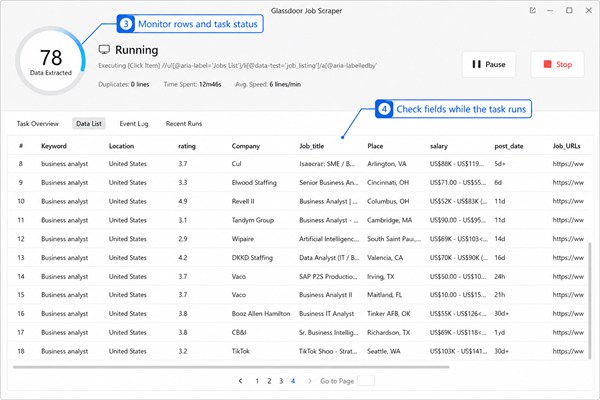
At the time of this test, the current Glassdoor Job Scraper did not offer Run in Web Browser, while Run with Desktop App remained available. That limitation has a practical advantage: the extraction runs in a visible local environment, so you can watch the page load, inspect fields as rows arrive, and stop the task when the rendered page no longer matches the expected workflow.
- Visible troubleshooting: You can see whether Glassdoor returned job listings, a consent page, an empty state, or an access challenge instead of discovering the problem after an unattended run.
- Better control over dynamic pages: Local browser modes are useful when a page depends on JavaScript, scrolling, repeated clicks, or a permitted browser session.
- Field-level validation: The live data table lets you check company, title, location, rating, salary, date, and URL fields before exporting the full dataset.
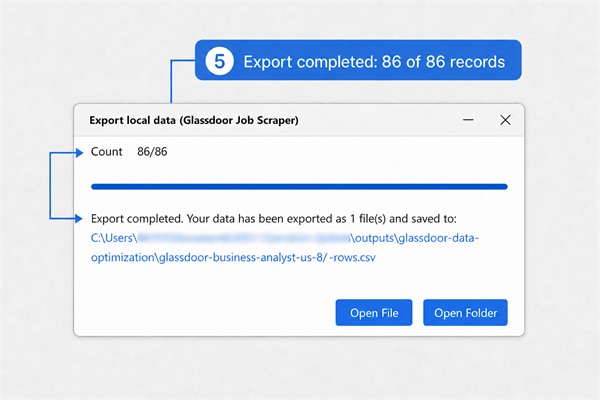
- Immediate local export: Once the completed rows look correct, you can export them to a local file and verify the row and column counts before analysis.
Direct browser access illustrates why that visibility matters. In our check on August 25, 2026, a Glassdoor salary page stopped at a Humans only verification screen, while the account route required sign-in. These are access states to recognize and handle within Glassdoor’s rules – not controls to bypass. A visible Desktop run makes it easier to pause the workflow, confirm what the browser actually returned, and complete permitted session steps before trusting the output.
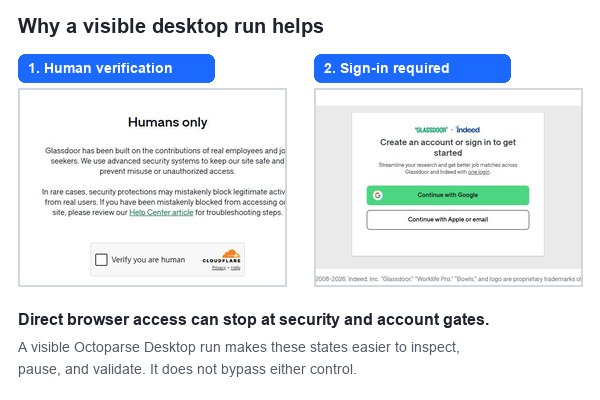
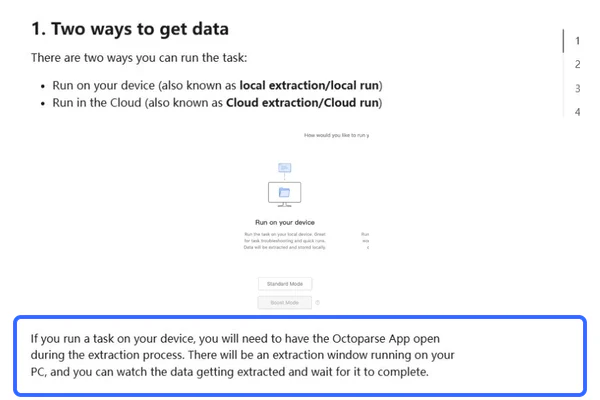
Desktop execution is not a background cloud service. The Octoparse app and computer must remain available during the run, which makes this mode better suited to validation and difficult pages than unattended scheduling. Octoparse’s local and cloud extraction guide explains the operational difference. For this Glassdoor template, the extra visibility is valuable because a completed status alone does not prove that the returned rows are complete or usable.
A Real Glassdoor Job Scraper Test
We ran a fresh small-sample check of the current Glassdoor Job Scraper on September 21, 2026. The run used the keyword business analyst, location New York, NY, and a result limit of 10. It completed in 21 seconds with 10 rows, no duplicates, and no CAPTCHA events.
This is a dated validation sample, not a promise of market coverage. Glassdoor inventory, displayed fields, access conditions, and salary availability can change between runs. Keep the task receipt and source parameters with every export.
Test Configuration and Observed Result
| Test item | Observed value |
| Task | glassdoor-blog-refresh-20260921-small (Glassdoor Job Scraper v5) |
| Keyword | business analyst |
| Location | New York, NY |
| Filters | Easy Apply off, Remote only off, all company sizes, most relevant sort |
| Results limit | 10 |
| Execution | Completed September 21, 2026; 21 seconds; 6 cloud nodes; 0 CAPTCHA events |
| Rows | 10 completed rows; 0 duplicates |
| Verified fields | Title, employer, location, rating, salary bounds, currency, pay period, job URL, description, age, and source identifiers |
The returned rows included employers such as BlackRock, NYU, Specialist Staffing Group, RBC, Deloitte, TikTok, and Tapestry. Salary values were present for some records and blank for others, which is why the export should preserve both the displayed value and its currency or pay-period context.
- Open the current template. Review the current input fields before starting.
- Start with a small sample. Enter one keyword and location, set a low result limit, and confirm that the rendered results match the intended query.
- Inspect the schema. Check title, employer, location, salary, rating, date, description, and URL fields while the run is active.
- Verify the completed export. Confirm the final row count, duplicate count, and a sample of source URLs before scaling the input.
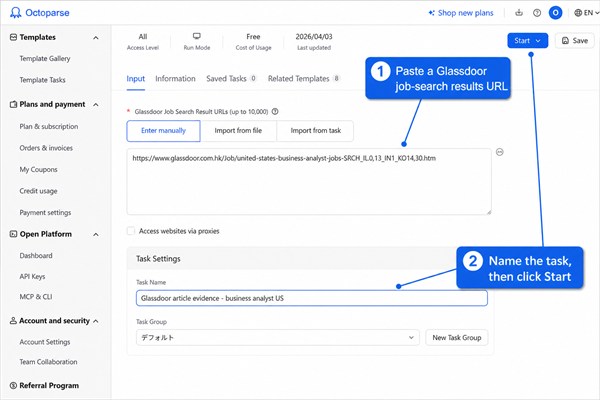
The current test confirms that the template can return structured job-result fields for the selected query at the time of the run. It does not establish complete coverage, stable row counts, or universal salary availability. Re-run a small sample after material template or site changes.
The template page currently accepts up to 10,000 job-search result URLs per run. That is an input ceiling, not a guarantee that every URL will return data. Page availability, access conditions, and displayed fields still determine the output.
When you are ready to repeat the test, start with one authorized query before scaling the input list.
https://www.octoparse.com/template/glassdoor-job-scraper
How to Collect Company Reviews in Batches
A company-review project should use company review URLs as the input entity. This keeps every review tied to a stable company and source page, rather than mixing reviews with job listings or salary summaries.
- Prepare the company list. Build a small set of authorized company review URLs and attach a company identifier to each source.
- Create one Octoparse Desktop task. Load a representative review page and complete any permitted login step manually.
- Select the repeated review unit. Capture only fields visible in the review card, such as rating, review title, pros, cons, role, location, and date.
- Configure pagination or load-more behavior. Test the second and final available page instead of assuming the first page represents the entire company.
- Add the URL-list loop. Feed company URLs into the tested workflow and retain both company ID and source URL in every row.
- Run a controlled sample. Compare the exported rows with the visible source, inspect missing fields, and deduplicate before scaling.
Video Guide: Scrape Glassdoor Company Reviews with Octoparse
Watch this walkthrough to see how an Octoparse workflow can collect displayed Glassdoor company-review fields for an authorized research project.
For review analytics, remove direct identifiers that are not necessary, suppress combinations that could expose a reviewer, and report patterns at an aggregate level. A location, job title, and date can become identifying when the underlying team is small.
Download Octoparse Desktop to inspect rendered pages and validate fields before a larger review-data run.
How to Scrape Glassdoor Salary Data and Salary Ranges
Glassdoor salary data can appear on salary pages, company pages, and individual job listings. A useful Glassdoor salary scraper should preserve the source page and collect the role, company, location, pay range, pay period, currency, and collection date. These fields are necessary because two visible salary ranges may describe different locations, time periods, or estimate types.
The ready-made Glassdoor Job Scraper can capture salary fields when they are displayed in job-search results. For dedicated salary pages or company-level compensation research, an Octoparse Desktop workflow provides more control over page types, repeated fields, pagination, and validation. The September 21 small-sample test verified salary signals inside job listings; it did not test complete salary-detail pages.
Fields a Glassdoor Salary Scraper Should Collect
| Field | Why it matters | Validation check |
| Company and role | Defines the position being compared | Keep the displayed names and a normalized version |
| Location | Salary ranges vary by labor market | Separate city, region, and country when available |
| Low and high pay | Preserves the displayed Glassdoor salary range | Do not replace a range with an unsupported midpoint |
| Pay period | Distinguishes hourly, monthly, and annual figures | Normalize only after retaining the original label |
| Currency | Prevents invalid cross-market comparisons | Store the displayed currency or market context |
| Estimate or reported label | Separates different compensation concepts | Do not merge labels without a documented rule |
| Source URL and date | Makes every record traceable to a dated page | Retain both fields in the final export |
Choose the Right Method for Glassdoor Salary Ranges
Choose the salary workflow according to where the pay data appears. A job-results template is the fastest option for salary signals attached to open roles. A custom Desktop task is better for salary pages, company-by-role comparisons, or fields that require page interaction. Python is most useful after collection for authorized parsing, normalization, deduplication, and analysis; it should not be used to bypass login, CAPTCHA, or access controls.
Build a Glassdoor Salary Scraper Step by Step
- Define the comparison. Select the companies, roles, locations, pay periods, and currencies that belong in the same analysis.
- Choose representative inputs. Collect authorized salary-page URLs or job-search result URLs and test one page before adding a batch.
- Create the workflow. Use the job template for listing-level salary fields or build a Desktop task for salary-detail pages and custom interactions.
- Validate the schema. Confirm that company, role, location, low pay, high pay, pay period, currency, estimate label, and source URL map to the correct visible values.
- Test page coverage. Check pagination, load-more behavior, missing values, and at least one page near the end of the accessible result set.
- Export a sample first. Open the file, count completed rows, inspect several source URLs, and compare the exported ranges with the rendered pages.
- Normalize without erasing evidence. Convert hourly, monthly, and annual figures in a separate transformation while retaining the original value, unit, currency, source URL, and collection date.
How to Compare Glassdoor Salary Ranges Reliably
Salary-range analysis should compare like with like. Separate base pay from total pay, preserve bonuses or additional compensation as distinct fields, and never compare hourly and annual figures before normalization. Calculate a midpoint only when the displayed low and high values use the same currency and pay period. Treat missing currency, location, or estimate labels as data-quality exceptions rather than filling them with assumptions.
Glassdoor salaries are time-sensitive observations, not permanent market facts. Store the collection date, measure missing fields, deduplicate repeated listings, and manually verify a sample before using the dataset for compensation benchmarking, recruiting, or workforce planning.
Discuss your Glassdoor salary data project with the Octoparse team.
Why Glassdoor Scraping Fails: Sessions, Dynamic Pages, and Anti-Bot Controls
Scraping Glassdoor can fail even when the selectors look correct. A page may require session state, render content dynamically, challenge automated access, or change its HTML structure. A script that works once is a prototype, not yet a dependable workflow.
Common Failure Modes and Responsible Responses
| Symptom | Possible condition | Responsible response |
| Login or consent page | Session is missing or has expired | Use an authorized account and complete the step manually |
| CAPTCHA or challenge | Automated access has been challenged | Pause; do not code around the control |
| 403, 429, or empty output | Access restriction, throttling, or unavailable content | Stop the run, lower load, and confirm permission |
| Fields suddenly become blank | Dynamic rendering or selector changes | Inspect the rendered page and update the workflow |
| Partial review history | Pagination, load-more, or visibility limits | Validate first, middle, and last accessible pages |
Octoparse’s current Desktop release notes describe local-browser and Chrome-mode options for login or CAPTCHA-protected scenarios. Those modes can preserve a permitted browser session, but they do not grant permission or justify bypassing a site’s controls.
Is Glassdoor Scraping Legal and Compliant?
Public visibility does not automatically create permission to collect, reuse, or commercialize data. The Glassdoor Terms of Use, revised July 1, 2026, say users must not introduce automated agents or scrape, strip, or mine data without express written permission. The terms also prohibit attempts to circumvent security features.
Review data deserves additional care. Glassdoor states that some reviews may display an employer, job title, or location. It also warns that combining semi-anonymous details can narrow a person’s identity. Its Trust and Transparency page emphasizes authentic reviews and reviewer anonymity.
- Obtain written permission or use a formal data-access agreement before automated collection.
- Collect the minimum fields needed for a documented, lawful purpose.
- Do not bypass CAPTCHAs, login restrictions, access controls, or other security mechanisms.
- Do not use review data to identify, profile, intimidate, or retaliate against an individual.
- Set retention, access, deletion, and incident-response rules before storing the dataset.
- Recheck the current terms, privacy rules, and applicable law before each recurring project.
This article is technical information, not legal advice. If permission, jurisdiction, personal data, or downstream reuse is uncertain, obtain legal review before running the workflow.
How to Scrape Glassdoor Reviews with Python for Authorized Use
Users searching for “scrape Glassdoor reviews Python” often expect a few lines of requests and Beautiful Soup. That approach is brittle on session-based, dynamically rendered pages and must not be used to evade access controls. A safer example is to parse an HTML file obtained through an authorized workflow.
The following parser uses Beautiful Soup’s documented CSS selector interface. The selectors are examples and must be checked against the authorized HTML you actually receive.
The code intentionally contains no login automation, CAPTCHA bypass, proxy rotation, or security-evasion logic. For a recurring authorized project, add schema validation, logging, test fixtures, and a human review step before scaling.
How to Validate Glassdoor Review and Salary Data
Validation should happen before a large run, not after the dataset has entered a report. Review records and salary records require different tests.
Minimum Data Quality Checks
| Check | Company reviews | Salary data |
| Source traceability | Keep company and review-page URLs | Keep company, role, location, and salary-page URLs |
| Completeness | Measure missing rating, title, date, pros, and cons | Measure missing pay range, period, currency, and estimate type |
| Deduplication | Use company, date, title, and text hash | Use company, role, location, range, and collection date |
| Manual sample | Compare rows with visible review cards | Compare ranges and labels with source pages |
| Privacy | Remove unnecessary identifying combinations | Avoid personal applicant or reviewer details |
For jobs rather than reviews or salaries, follow the separate Glassdoor job information tutorial. Keeping job, review, and salary workflows separate makes failures easier to diagnose and prevents one schema from becoming an unreadable collection of mostly empty fields.
FAQs about Glassdoor Scraping
- What is the best way to scrape Glassdoor company reviews?
For an authorized project, a custom Octoparse Desktop task provides control over review fields, pagination, company URL lists, and validation. The ready-made job template is better suited to job-search results.
- Can the Glassdoor template collect salary data?
The current job template can return salary fields when Glassdoor displays them in job results. A dedicated Desktop task is more appropriate for batch salary-page research and normalization.
- Why does a Glassdoor scraper return zero rows?
Common causes include an expired session, a challenge page, an unavailable URL, dynamic content that has not loaded, or selectors that no longer match. Stop the run, inspect the rendered page, and confirm authorization before retrying.
- Is publicly visible Glassdoor data automatically safe to scrape?
No. Public visibility is not the same as permission. Review the current Glassdoor terms, obtain required permission, minimize personal data, and consider the intended reuse before collecting anything.
- Should company reviews and salary data use one scraper?
Usually not. Separate workflows produce cleaner fields, simpler pagination, clearer validation, and fewer empty columns. The datasets can be joined later by a normalized company identifier.
- Does Glassdoor have an official API?
Glassdoor still hosts official API documentation and an account-based key registration page. Some job APIs are limited to approved partners. Treat official API access as a separate, permissioned route rather than assuming that a scraper can replace an API agreement.
Build the Dataset Around the Decision
Glassdoor scraping is most useful when the source, permission, schema, and analytical purpose are decided before the run. Use the ready-made template for job-result research, a custom Desktop workflow for company reviews or salary pages, and Python for authorized parsing and downstream processing. Keep review anonymity, access controls, and current platform terms in the design from the beginning.